These pictures are from videos put out by Baltimore County Schools.
They show children using screens on classes. Does this seem healthy to you?
See these pictures showing eye to computer screen in our schools. Long gone are the days of eye to eye contact it seems. Is this really what we want for our children?
Children with necks bent over laptops staring at screens, headsets on and unaware of the people near them.
Children are hunched over. Is this good for their posture?
Young boy with wireless laptop on his lap.
Look how close the kids eyes are to the screens. Look how they are hunched over.
Children with earphones. How will this effect their hearing?
More laptops on lap in positions that are not good for the back and neck.
These images are from Baltimore County's videos. We are very concerned that the county and state are not considering the physical implications of such postures. See below.
OSHA has created a workplace safety checklist. Does your school make the grade? Read it here.
Here is OSHA's Checklist. We filled it out based on what we saw in these videos.
WORKING POSTURES - The workstation is designed or arranged for doing computer tasks so it allows your...
SEATING - Consider these points when evaluating the chair...
KEYBOARD/INPUT DEVICE - Consider these points when evaluating the keyboard or pointing device. The keyboard/input device is designed or arranged for doing computer tasks so the...
The Baltimore County School District is funding a 270 million dollar technology program. The last few months of Board of Education meetings have focused on the health and safety issues posed by screen time after parents raised strong concerns.
In Baltimore, countless parents are raising a multitude of concerns about the program. Parents are calling for a halt to the STAT Technology program which stands for Students and Teachers Accessing Tomorrow.
Please check out the excellent parent educator STAR blog here. This blog details everything you need to know about the Baltimore STAT Program. "The ongoing investment of money and personnel in an unproven one-to-one computer tablet program shifts resources away from the basic necessities of comfort, safety, food, and meaningful human interaction."
In Baltimore, asthma rates in children are very high and the heat exacerbates symptoms. Old buildings with poor circulation and antiquated HVAC systems create indoor air quality issues that pose health risks to students with asthma and respiratory health issues.
Please watch these videos below where students talk about the conditions of their school buildings.
It is notable that in addition to concerns about the technology, parents are also coming in to talk about the lack of air conditioning in schools and how children are unable to learn in such hot conditions. They are concerned about the poor condition of the ageing schools and asking for renovations and for new schools to be built. They are questioning why money os being spent on computers when it should be spent on aging infrastructure. Watch a Tech executive visit a Baltimore School. How much money is he making a year to sell this crap to our kids?
Safe Tech has created a playlist on Youtube of Baltimore parents so that you can watch even more videos of these parents testimony including the testimony about air conditioning and the lack of recess.
In this video an Onteora School District Trustee reads the Phoenicia PTA's Letter where the PTA calls for the Wi-Fi to be turned OFF.
Facts About the New York State Onteora School District Wi-Fi Debate
1. Parents initiated a dialogue on the health risks of Wireless radiation. The Board grappled with the decision to turn the Wi-Fi off while gathering data. The local Woodstock Times paper covered some of the debate.
Listen to a Sixth grader talk about her WiFi concerns.
2. The District created a Wi-Fi Task Force
According to the Board minutes, the Task force was charged to "Review studies and determine if precautionary principle should be done for our youngest students, which is to remove Wi-Fi from the elementary building until the industry proves it is safe. Look at both sides of the research and most up-to-date research. They were to consider the health implications and pros and cons in terms of technology in 21stcentury learning and get Input from administrators and school personnel." They were to make a recommendation to the Board. Read about it in the Onteroa meeting minutes of August 11, 2015 (page 27, point 11) here.
Watch a video where the Board discusses the WiFi Task Force here.
3. In March a Notice of Wi-Fi Radiation Legal Liability Was Served to New York School District Board of Education Members
The Wi-Fi Task Force was formed to gather information. Then it was disbanded by the Board of Education without any transparency in the process. Parents served the New York Onteroa School District Superintendent Victoria Mclaren and Board of Education members a notice of their liability concerning the health risks from the wi-fi installation in this New York school district on the March 15, 2016 Board of Education Meeting.
"You have been urged to hardwire all your computers in the schools."
" Ignoring the above documented information and documented statements and proceeding with the use of WiFi routers in the schools, you are committing willful blindness and can be liable for child negligence, or possibly even "negligent endangerment of child" which carries with it criminal law repercussions if any student gets injured from the schools WiFi system and a parent decides to press charges."
Please watch below the video where parents served the Board members with this notice If you are wondering why we cannot see the parents, we were wondering the same thing. You can watch the full Board meeting at this link to the School District website.
THIS NOTICE STATES:
Board members who voted in for keeping the Wi-Fi are now personally liable if a child is harmed by the wireless radiation exposures.
They could be sued for "willful blindness","child negligence" or possibly even charged with "reckless endangerment of a child" of which the latter carries criminal penalties.
The BOE is held liable for violating "Open Government Law," by misusing "Executive Session" option designed to keep public agencies court strategies private when litigation is in process. The Board apparently disbanded the Wi-Fi Task Force and denied access of the minutes of that meeting to the public. The BOE then stated "the efficacy of the group" was the reason for disbanding it.
WHAT CAN I DO? Concerned parents in the United States can also send notarized " No-Consent to WiFi " letters to their BOE. This an important step towards accountability. Examples of A Parents Do NOT CONSENT Letter For Schools:
“As firefighters and paramedics, we live in these firehouses. What effect will these towers have on us? What are the risks to our neighbors? It’s a no-brainer that LA County should at least have done a proper study before before putting 200-foot high-power microwave antennas on top of our heads."
DIVISION OF OCCUPATIONAL HEALTH, SAFETY AND MEDICINE
The IAFF Official Position Against Cell Towers on Fire Stations
"The IAFF opposes the use of fire stations as base stations for towers and/or antennas for the conduction of cell phone transmissions until a study with the highest scientific merit and integrity on health effects of exposure to low-intensity RF/MW radiation is conducted and it is proven that such sitings are not hazardous to the health of our members."
The IAFF Official Position Against Cell Towers on Fire stations passed in 2004
This Position was initiated after increasing complaints among firefighters with cellular antennas on their stations coupled with a California study showing neurological damage in California firefighters with antennas on top of their stations conducted by Dr. Gunnar Heuser.
United Firefighters of Los Angeles City Local 112 IAFF-CIO-CLC
Opposes Cell Towers on Their Stations.
“UFLAC will strongly oppose the use of Fire Stations as base locations for cell towers"
“ It is inexcusable that once again our firefighters in the field were the last to know about a massive 150 million dollar project that could jeopardize their health and safety. ... nobody talked to us and we have not heard from one single expert who has told us that this project will be safe.”


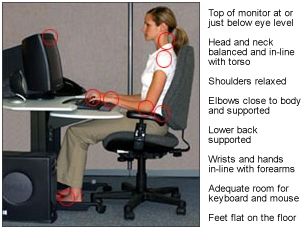
 SEATING - Consider these points when evaluating the chair...


